

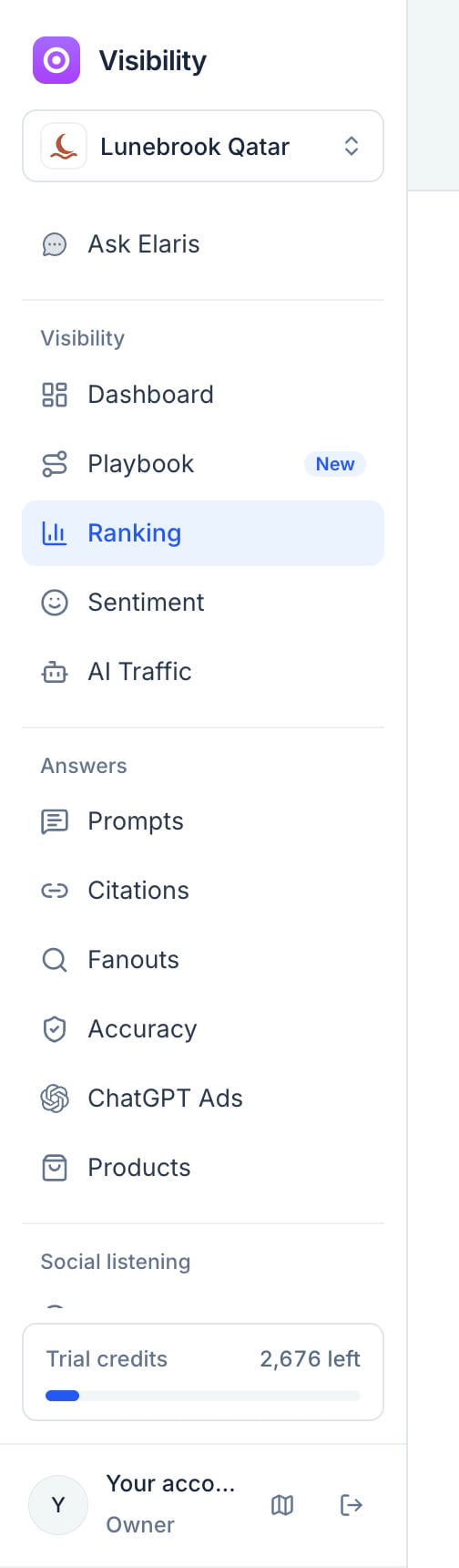
The sidebar, grouped the way this page is.
Visibility
Dashboard
The headline view for one market: your visibility and its trend (by language), your targets, your brand demand, where you stand against competitors, your top gaps (topics a competitor wins, weighted by search demand), share of voice, visibility by engine with the weighted score, memory or web, a competitor-by-topic matrix, and your site’s health. Start here each week. Memory or web shows, for ChatGPT and Gemini, how often the app answered from what its model already knows instead of searching the web, and how often it named you (and your leading competitors) either way, with 95% ranges. It tells you where a gap is. Named when it searches but rarely from memory, the gap is in the model’s memory: that moves slowly, with mentions in the press, reviews, reference sites and forums over months and with new model versions, and fixes to your own site won’t reach it. Named from memory but less when it searches, the gap is on the web: the pages it reads name others, and that can change within weeks. An answer counts as searched when it cited a page or ran a search. Engines that search before every answer (Google’s AI answers, Perplexity) are left out, and so are answers collected through a model’s API, which always search. Targets say where you want visibility, citation rate or share of voice to be, for the region or one topic, and by when. Each card shows today’s value (the last 14 days of non-branded answers) against the goal, a tick where steady progress would put you today, and whether you’re on track, behind or there, with the points a week still needed. Brand demand puts three lines on one chart, week by week for the last 26 finished weeks: Google searches naming your brand in the market’s country (from Search Console), how many AI answers name you, and your share of voice. Each line is indexed to its own average, so a count in the thousands and a share in per cent read together: if AI answers name you more, do more people search for you? The numbers above the chart compare the last four weeks with the four before; hover a week for its numbers. Without Search Console the AI lines still show.Playbook
A six-month plan for being named in more AI answers, in four phases: measure and set goals, fix the site, write content AI can quote, then earn mentions and check the results. Each of its 19 steps reads your own data and ticks itself off when it’s done (a target set, the readability checks passing, facts on file, posts refreshed, gaps closed in the Action Center), so the plan keeps itself up to date. Give any step an owner and a date, mark it done or skip it, and press Share for a read-only link to send to anyone, such as a client or your manager.Ranking
Every brand AI names in your market, with its visibility and range, change, average position and sentiment. Brands AI keeps naming that you don’t track yet appear at the top as suggestions: press Track to add one as a competitor. Click any brand for its own page: visibility by engine, sentiment, the sites citing it and recent mentions.Competitor moves
What your competitors change on the pages AI cites, and whether AI took notice. Every week Elaris reads up to eight pages of each tracked competitor (the ones your region’s answers cite most) and keeps what changed: a new FAQ, a table, new sections, prices, new markup, a rewrite or a new title. A page published in the last six weeks shows as a new page, and a page moved to a new address on its site is followed there. Some sites block automated readers like ours, and the page says which: changes on those sites can’t be seen, but when AI answers suddenly cite one of their pages far more often (at least twice as often as in the four weeks before), that shows as a move. Under Elsewhere are pages on other sites that AI answers started citing and that name a competitor, with whether they name you too. Each move shows what it did for them: their share of answers on the prompts the page is about in the four weeks before and the weeks since, set against the same change on their other prompts, so a model update or a quiet week doesn’t count as the move. The verdict is Worked for them or Lost them ground only when the 95% range is clear of zero; it’s Too early to tell for the first week. It’s evidence by timing, not proof: anything else that changed the same weeks moves the same numbers, and the move’s page lists the competitor’s other moves near it. See the change shows the diff and the prompts behind the number; Draft our version opens Fix this on it (a page of yours that answers the same questions, a pitch to the site for a page elsewhere, a price check for prices). Moves that worked also become Action Center suggestions and appear in the weekly digest. Competitor moves are on the trial and on Growth, Scale and Enterprise, and on Agency Core; on Starter its page shows what it holds, blurred.Sentiment
How AI describes your brand: the share of positive mentions, the themes behind them (strengths, weaknesses, positioning) and the quotes that produced each score. With Google Maps reviews connected, it also shows each store’s rating, praise and complaints. Sentiment is on Growth, Scale and Enterprise, and on Agency Core; on Trial and Starter its page shows what it holds, blurred.Answers
Prompts
Your topics and their prompts, with visibility per prompt. Open a topic for three tabs:- Prompts: each question and how you do on it.
- Content gaps: prompts where competitors are named and you aren’t, with the searches the AI ran and the pages it read. Write a brief turns a gap into a content brief you can download.
- Outreach: the pages AI cites for the topic, whether each names you, and a suggested next step. Export the list as CSV for PR work.
Citations
The websites and pages AI cites, how often, whether they name you or competitors, and what kind of site each is (yours, a competitor’s, a channel partner or independent). These are the sites worth being on.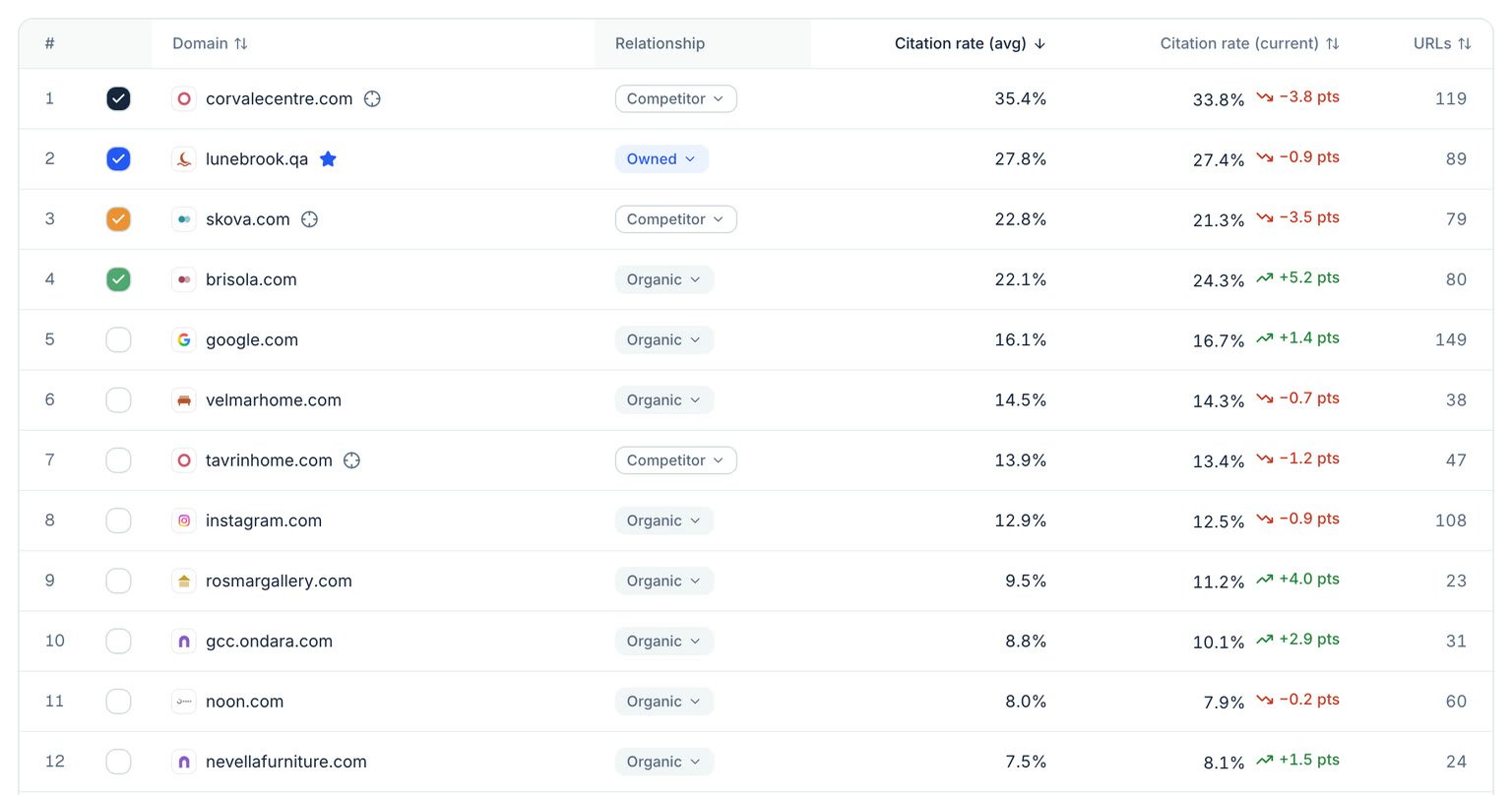
Citations: the domains AI cites, their relationship to you, and how often each one is cited.
Fanouts
The searches AI ran before answering: which words it adds or drops, and how often it adds your brand name on its own (brand injection). The Long-tail coverage tab says how much of that long tail has a page of yours: the searches AI ran, and niche prompts (under 100 Google searches a month, or none on file). A search counts as covered when answers cited a page of your site for it, or when a page in your Library carries its words in its title, headings or address (places like Doha and words like “best” or “shop” are left out). It shows coverage by topic, what has no page of yours, most answered first, and the page that covers the rest. Topics with three or more uncovered become an Action Center suggestion whose Fix this drafts the page.Accuracy
Claims AI makes about you that are wrong or outdated, by severity and engine, and your fact sheet. Add facts with valid-until dates so expired offers are caught too.ChatGPT Ads
Sponsored placements shown inside ChatGPT answers, by advertiser. Ads appear only where ChatGPT serves them: so far that is the United States, so markets elsewhere usually show none.Shopping
The product cards ChatGPT, Google AI Mode and Copilot show beside their answers, down to each product: your share of the shelf against competitors, whose product takes the first card, which shops the cards send people to (and how often that’s your own site), which prompts show your products and which show only others’. Each product has a page with its price at each shop and the prompts that showed it. Google Shopping prices for searches you track sit in the same place. Connect your store’s Google Shopping feed (Connect Google Shopping, at the top of Shopping) or, without one, import your products from your website, and Shopping lists your whole catalogue, SKU by SKU, with which products AI shows and which it never does. With Merchant Center, Connect with Google is enough: sign in with the account that runs it, and your products, prices and stock are read daily, with no link to find. Google asks to manage your listings, as Merchant Center has no read-only access; Elaris only reads them. A website import reads only the product list your site publishes for search engines, once a week, never your product pages; prices and stock come with a feed. Shopping also reads what each answer says about the products its cards show: how it describes them and the qualities it credits them with, yours next to your competitors’, so you can see what each one is picked for. With a feed, Shopping checks your products against it: prices AI quotes that differ from yours, products it recommends while you’re out of stock, and how ready your feed is for ChatGPT, Google AI Mode and Copilot. Shopping alerts tell you when your products drop off the cards, in the bell, in Slack and in the weekly email.Reddit, YouTube and LinkedIn
The threads, videos and LinkedIn posts AI cites, so you can see which conversations shape its answers, grouped by subreddit, channel or author. They sit with social listening, an add-on ($99 a month for 1 region or $199 for 3, collected every 3 days) that Enterprise includes. Leads, the people asking for what you sell, are on Enterprise.Social backlinks
The social pages AI cites (Reddit threads, videos, posts and profiles), read for links to your site and your competitors’: which link you, which link a competitor and not you, and which name you without a link. Pages are read after each run, along with the links people share in the posts social listening reads, and the Action Center suggests where to earn a link first.Workspace
- AI Traffic: which AI agents and crawlers read your site. See AI traffic.
- Library: your site’s pages from its sitemap, with health checks, AI traffic and citation rate, and impressions, clicks and sessions from AI once Search Console and Analytics are connected. The Blog tab finds every post in your site’s sitemaps (each language’s) and reads it weekly: a 13-check health score (structure, plus how an answer can quote the page: its opening, tables, author and sources), when it was last updated, its length, how often AI answers cited it in the last 90 days, and a status:Protect (cited and healthy), Fix (cited but weak, out of date, or used without naming you) or Optimise (not cited yet). The Bing column says whether Bing’s index holds each page, looked up weekly: ChatGPT’s search finds pages through Bing. Each page also has a Page history (in its menu, or its health drawer): Elaris keeps the page’s main text every time a read finds it changed (posts and the home page each week, any page when its health check runs), up to 30 versions, and shows what changed between them beside how often AI answers cited the page each week.
- Action Center: what to do next, with the numbers behind each suggestion. Suggestions come from the blog audit, site checks (AI crawlers blocked in robots.txt, your organisation markup, each failing bot readability check with steps to fix it, and plain pages crawlers can read when answers rarely cite your site), content gaps (topics where answers name others and not you, and long-tail searches no page of yours covers) and influential sources (sites AI cites that leave you out, worded for what each one is: a Google Maps listing to complete, a store to sell through or track, a conversation to join, an editor to contact). Accept one and it moves to To do, then In progress and Completed; dismissed ones aren’t suggested again, and the checks close suggestions once the problem is gone.
- Fix this: on any suggestion, Elaris makes the fix itself, ready to use: a corrected robots.txt, Organization markup, an llms.txt or sitemap.xml built from your pages, firewall settings, developer tickets, new titles, FAQ blocks with their markup, page edits, a full page draft for a content gap or a topic’s long tail, or an outreach email. Each fix has its steps and files to copy or download, is written in your market’s language (and can be made in its others), and everyone in the workspace sees it under Action Center → Fixes. Share link gives a read-only page to anyone you send it to; Send to Slack posts it to the channel connected in Settings → Integrations. Mark it as shipped when it’s live and the suggestion is completed.
- Ask Elaris: a chat that answers questions about your numbers and the app. Turn on Think beside the send button for harder questions: it reads the whole conversation, looks at more of your data and suggests what to do next. Ask it why something changed (“Why did our visibility drop this week?”) and it first gathers the same evidence every time, comparing the last week, two weeks or month with the same span before: visibility by day and engine, prompts won and lost, citations gained and lost, competitors that moved, the bot readability audit, Search Console, pages whose text changed, and your own changes (prompts added, change-log notes, fixes shipped). Under the answer it lists what it checked and what it couldn’t.
- Settings: workspace, market, members, collection, scorers, integrations and the change log. See Workspace and team.
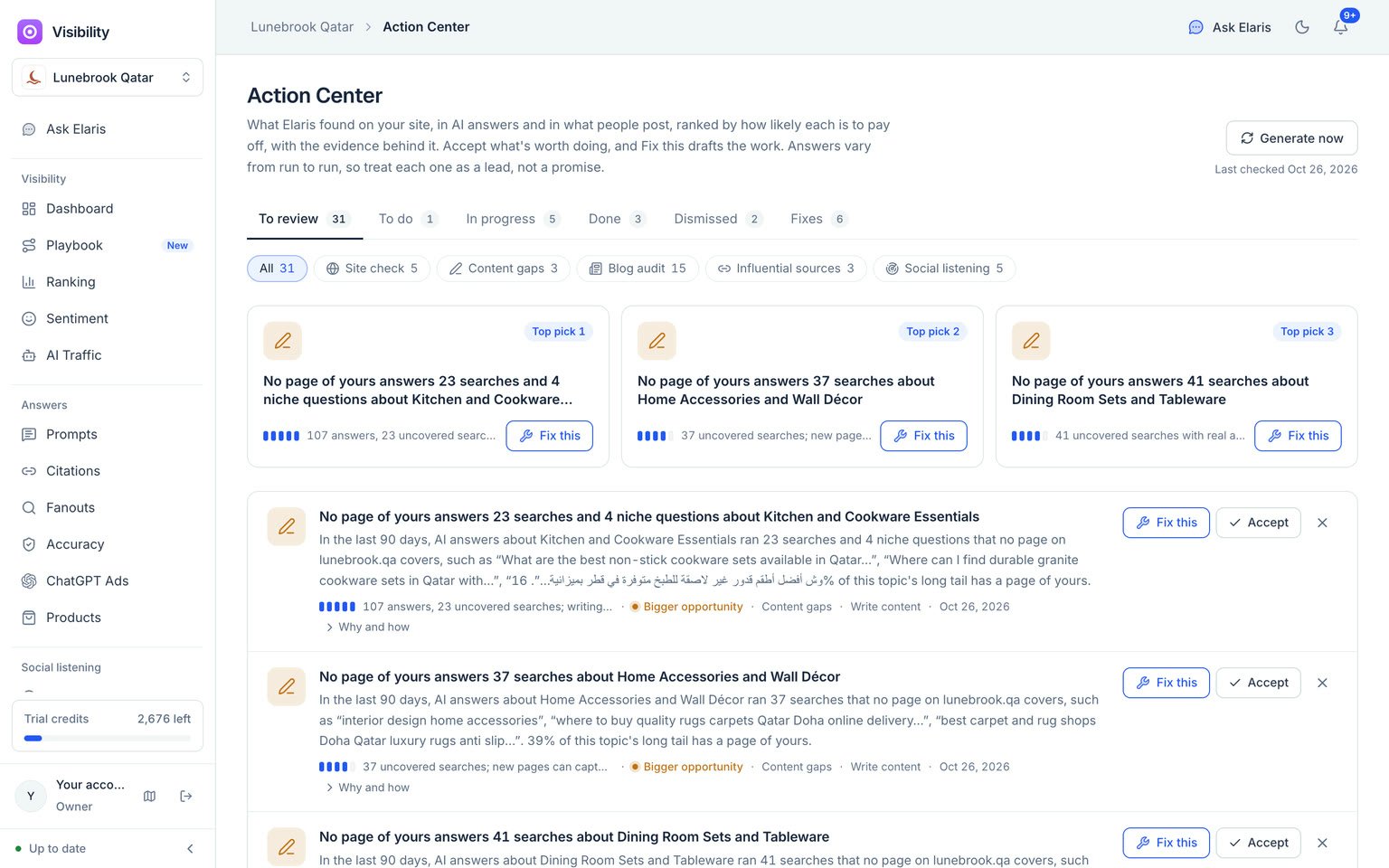
The Action Center: each suggestion leads with its evidence, and Fix this drafts the work.
Common tasks
Add a competitor
Settings → Market → Your brand and primary competitors → search by name or paste the website. Or press Track on a suggestion on the Ranking page.A brand is being missed
Add an alias in Settings → Market, for example its Arabic or other local spelling, or a short name people use.Add prompts
Prompts → open a topic → Add prompts. Type your own, or generate them from the topic’s keywords. Select prompts to move, tag, mark as branded, archive, or add their other-language version.Win a topic you’re losing
- On the Dashboard, pick a gap from Top gaps.
- Open the topic → Content gaps to see the questions you’re missing and the pages AI reads for them.
- Press Write a brief and publish the page.
- In Outreach, filter to pages that don’t name you and export the list for your PR team.
- Add a note in the change log so the date shows on your charts, then watch the topic over the next runs.
Find out why a number moved
- Ask Elaris “Why did our visibility change this week?” (or this month, or on one engine).
- Read the likeliest reasons it gives, each tied to a piece of evidence, and the list of what it checked under the answer.
- Open a page it names under Page history to see exactly what changed on it, and when, beside its citations.
Tell Bing the moment a page changes
- Settings → Integrations → Search engines → Set up IndexNow (admins).
- Add the key file it gives you to the root of your site: a text file named after the key, holding only the key. Most site builders and CMSs let you upload one.
- Press Check the key file. From then on, new and updated Library pages, and the pages a shipped fix touches, are sent to IndexNow within minutes.
Track another country
Settings → Collection → Add a region. Brands, topics and prompts are copied, and the new region gets its own dashboard; switch between regions from the top bar. Prompts that name the first country, its cities or its currency are rewritten for the new one (Dubai becomes Doha, dirhams become riyals); prompts that name no country are copied as they are. Any prompt that still names another country than its region is marked on the Prompts page.Not sure where something is? Ask Elaris. It knows every page and button and links you straight to them.